

This article covers setting independent default posting periods for the Sales Ledger and Purchase Ledger on a Financial Year Group in iplicit. This lets each ledger default new documents to a different period during period-end, without closing any period. For why iplicit doesn't support closing ledgers separately, see 'Can I close the Sales Ledger or Purchase Ledger separately from the Nominal Ledger'.
Before you start
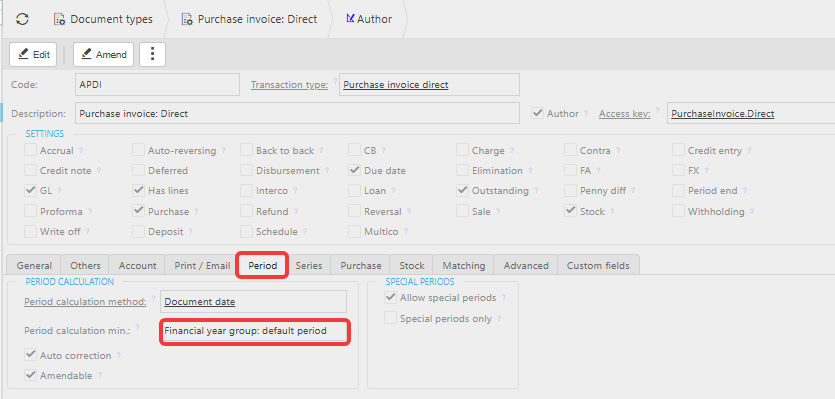
Default posting periods only affect document types set to use the Financial Year Group default period as their minimum posting period. Check this on each document type before relying on the Sales Ledger or Purchase Ledger default period to control where documents land.
- Navigate to Document Types and open the relevant document type
- Select the 'Period' tab
- Confirm 'Period calculation min' is set to 'Financial year group: default period'
If a document type is set to 'Open periods' instead, it ignores the Financial Year Group default period entirely and uses the first open period.
Setting the default period for each ledger
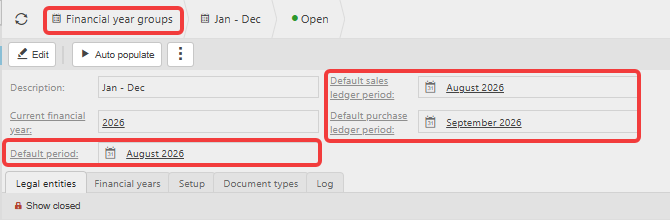
- Navigate to Financial year groups and open the relevant Financial Year Group
- On the 'Financial years' tab, locate the 'Default sales ledger period' and 'Default purchase ledger period' fields, alongside the existing 'Default period' field
- Set 'Default sales ledger period' to the period Sales Ledger documents should default to
- Set 'Default purchase ledger period' to the period Purchase Ledger documents should default to
- Leave 'Default period' as the period everything else - including the Nominal Ledger - should default to
Each ledger now defaults new documents to its own period. For example, the Sales Ledger and Nominal Ledger can stay on August while the Purchase Ledger moves on to September once it's finished for the month.
Moving a ledger's default period forward
Once a ledger is finished for the period, move its default period forward on the Financial Year Group to the next period. New documents in that ledger then default there instead. This can be done manually, or automatically using the auto roll forward settings - see 'How to automatically roll forward default periods per ledger'.
Things to know
- A document's date still determines which period it calculates into. The default period only sets the floor - a document dated after the default period uses its own date's period, while one dated on or before the default period is floored up to it. For the full behaviour, see 'Why does my document use a different period than the date I entered?'
- Setting a default period doesn't stop a user manually selecting an earlier open period unless the document type's 'Amendable' setting is also unticked
- This does not close any period. All ledgers remain open until the period itself is closed.
Default sales ledger period
Default purchase ledger period
Set default period per ledger
FYG default period
Financial year group default period
Manage ledgers separately
Move ledger period forward