

This article covers configuring 50% partial VAT recovery on a single line of a purchase invoice. The setup happens in two places: the tax group (where the partial rate of 50% is defined) and the purchase invoice (where the 'Partial Tax Ignore' column controls which lines the partial rate applies to).
Use this approach when one line on a purchase invoice qualifies for partial VAT recovery (for example, mixed business and private use) and the other lines follow standard VAT treatment.
Before you start
Partial VAT recovery in iplicit is controlled at the tax group level, not on individual documents. You will need:
- Permission to amend tax groups, if you do not have these reach out to your administrator for help
- The tax group used by the relevant purchase invoice lines
- The agreed partial recovery percentage (this article uses 50% as the example).
Enable partial VAT recovery on the tax group
Configuring partial VAT starts on the tax group used by the purchase invoice line:
- Go to 'Tax Groups'
- Open the relevant tax group
- Tick the 'Partial' checkbox
- Select the appropriate 'Partial Posting Method'
- Save the tax group.
This activates partial VAT functionality for any purchase invoice line that uses this tax group, but it does not yet define the recovery rate.
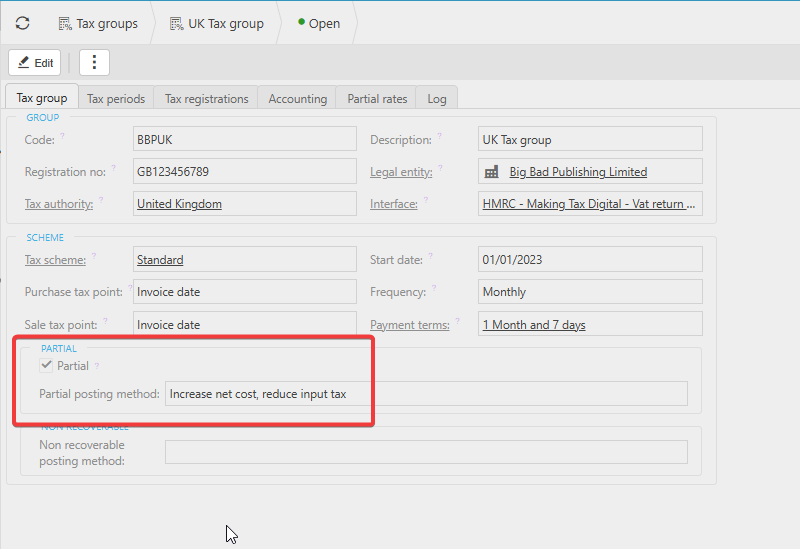
Set the partial rate to 50% on the tax group
This step is what tells iplicit to recover 50% of the VAT. Without it, partial VAT is enabled but no recovery percentage is applied:
- On the same tax group, open the 'Partial Rates' tab
- Select 'add' to add a partial rate when in edit mode
- Set the rate to 50% (or the percentage that applies to your scenario)
- Apply any criteria the rate should be restricted by (for example, effective date or specific posting attributes). Leave criteria blank if the 50% rate should apply universally on this tax group
- Save the partial rate.
The 50% partial rate is now stored on the tax group and ready to use on purchase invoice lines.
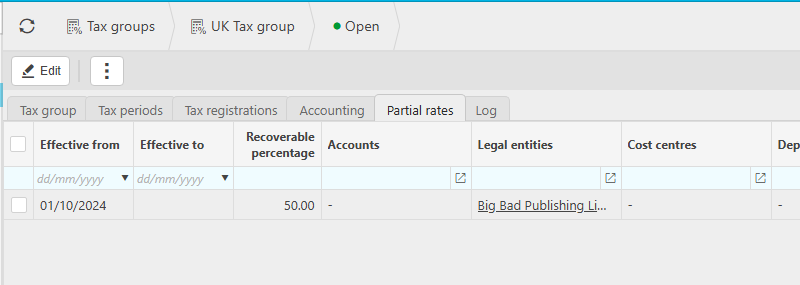
Expose the 'Partial Tax Ignore' column on the purchase invoice
The 'Partial Tax Ignore' column controls partial VAT line by line on the purchase invoice and is hidden by default:
- Open or create the purchase invoice
- On the invoice lines grid, select the cog icon (column chooser)
- Tick 'Partial Tax Ignore' so the column becomes visible
You can now control partial VAT recovery on a line-by-line basis on the purchase invoice.
Apply 50% VAT recovery to the correct line
By default, every line on a purchase invoice using a partial tax group will use the partial rate. 'Partial Tax Ignore' is the override that switches a line back to standard VAT:
- On the line where 50% VAT recovery should apply, leave 'Partial Tax Ignore' unticked
- On every other line, tick 'Partial Tax Ignore' so those lines use normal VAT rules
- Save and submit the purchase invoice as usual.
Only the unticked line will use the 50% partial rate defined on the tax group. All ticked lines will recover VAT at the standard rate for that tax group.
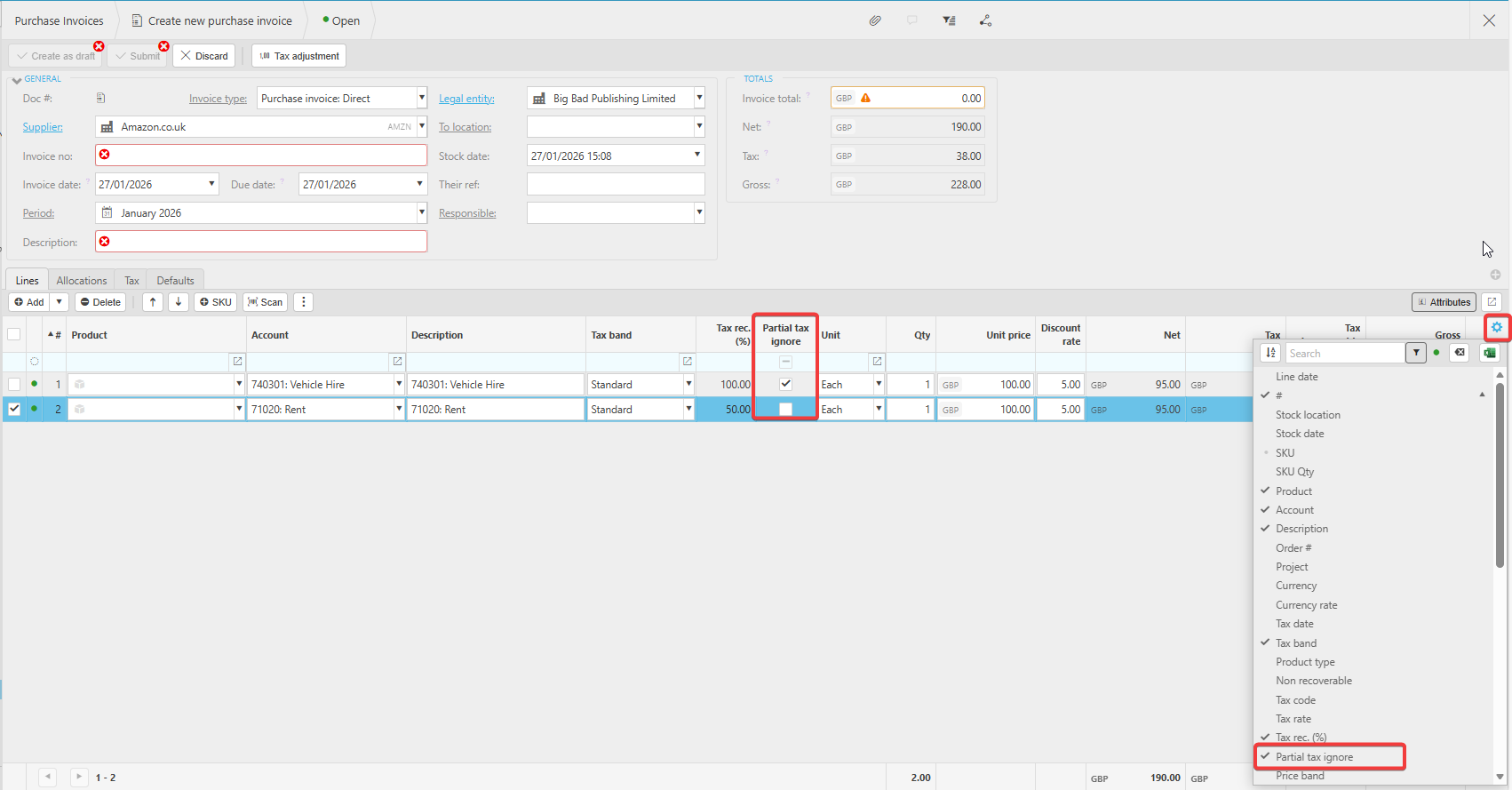
Things to check if the partial rate isn't applying
If the VAT recovery on the purchase invoice doesn't reflect 50%, check the following on the tax group:
- 'Partial' is ticked on the tax group used by that specific line
- A partial rate of 50% exists on the 'Partial Rates' tab and is active for the document date
- Any criteria set on the partial rate match the line in question
- 'Partial Tax Ignore' is unticked (not ticked) on the line that should receive 50% recovery.
Partial VAT
50% tax
Ignore partial tax
Tax for different lines