

This article covers the 'No available MTD periods found' error in iplicit continuing to show after you've synchronised MTD tax periods. If you haven't yet tried synchronising, see 'Why do I see "No MTD periods available" when submitting a VAT return' first.
Why this happens
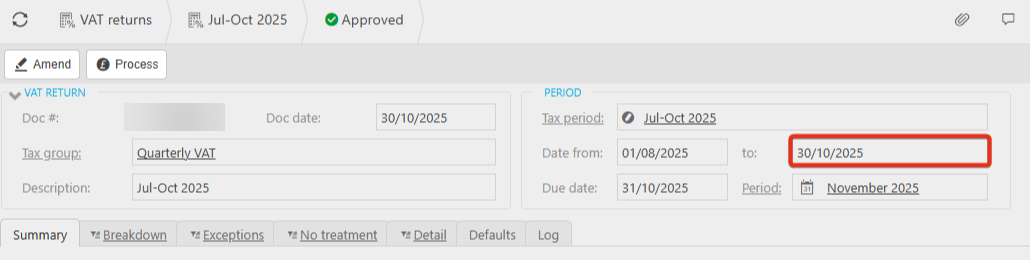
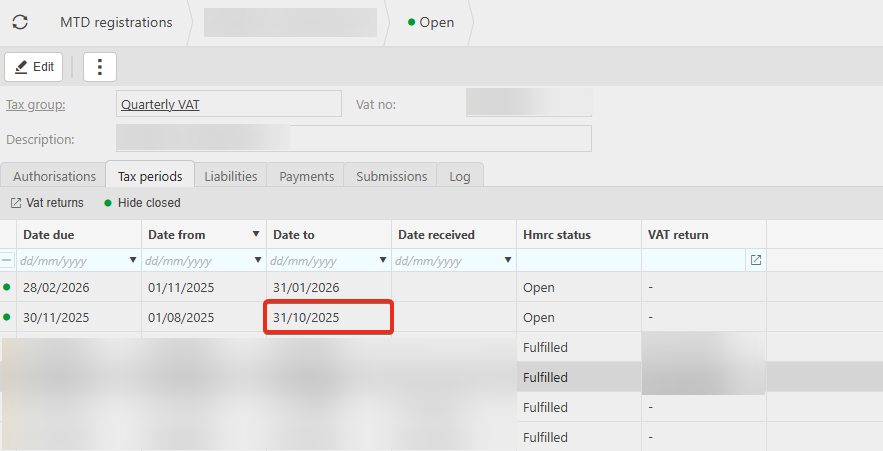
If the error persists after synchronising, the cause is often a date mismatch between the VAT return and the MTD tax period, rather than a sync problem. For example, the VAT return's 'To' date might be set to 30 October 2025, while the matching MTD tax period's 'To' date is set to 31 October 2025. Because the two dates don't align exactly, iplicit can't find a matching period and shows 'No available MTD periods found' even though synchronising has already run.
Checking for a date mismatch
- Open the VAT return and note the 'To' date
- Open the corresponding MTD tax period and compare its 'To' date
- If the two dates don't match, this is likely the cause of the error.
Fixing the date mismatch
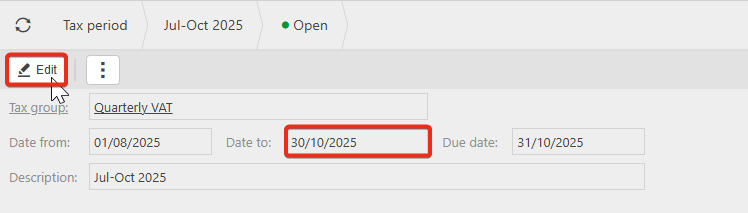
- Navigate to the tax period
- Select 'Edit'
- Amend the 'To' date so it matches the MTD tax period
- Save your changes and resubmit the VAT return.
No MTD periods available after sync
MTD periods still not showing
VAT return date mismatch MTD
Synchronised but still no MTD periods
MTD tax period to date wrong