

This article covers how consent alert dates work for Bank Feeds in iplicit – for what to do once a consent has actually expired, see 'Why has my bank feed stopped pulling through transactions'.
How iplicit populates the consent alert date
The consent alert date field on the Bank Feeds screen is populated automatically, after a reminder email has already been sent. It's a record that the reminder went out, not a scheduling tool, and you cannot edit or pre-set it.
Who controls when the consent reminder is sent
The timing of consent reminder emails is controlled by your bank, not by iplicit. Banks typically send these reminders seven to ten days before the consent expiry date. iplicit records that a reminder has been sent but does not determine when it's triggered.
Who receives the consent reminder email
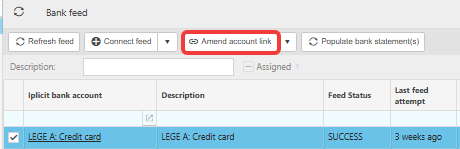
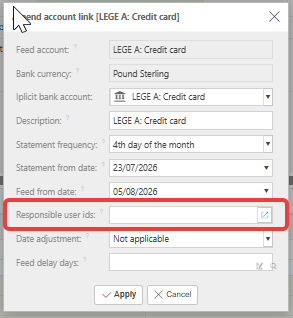
The reminder email is sent to whoever is listed as a responsible user on the Bank Feed. Any number of people can be added. To update who receives the reminder:
- Go to the Bank Feeds screen
- Select the relevant Bank Feed
- Select 'Amend account link'
- Update the 'Responsible user IDs' field
- Save the changes.

Consent for bank feeds
Consent expiry alert
Bank feed reminder
Bank feed renewal
Bank notification for consent