

iplicit does not support closing the Sales Ledger or Purchase Ledger separately from the Nominal Ledger. Financial periods apply across all ledgers at once. This includes scenarios where you want to restrict posting for specific document types - such as invoices - while keeping a prior period open for Nominal Ledger adjustments. This article explains the behaviour and how to control where users post by default.
Why iplicit works this way
Period closure in iplicit applies at the financial period level, not at the ledger level. This keeps the Sales Ledger, Purchase Ledger and Nominal Ledger aligned. Transactions cannot be posted to inconsistent periods across different areas of the system. There is no option to close a single ledger independently at this time.
If a prior period is open for Nominal Ledger adjustments, it is also open for Sales Ledger and Purchase Ledger posting unless you take steps to redirect where documents default.
How to control where users post by default in the Sales Ledger and Purchase Ledger
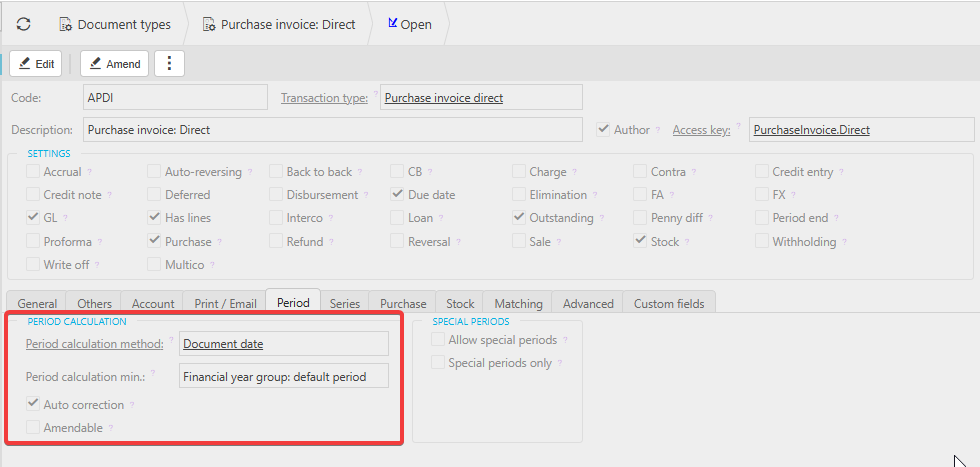
Even though period closure applies across all ledgers, you can prevent users from accidentally posting documents (including invoices) into a prior period by configuring the document settings within the Sales Ledger and Purchase Ledger.
- Navigate to the relevant document setting in the Sales Ledger or Purchase Ledger
- Change the period setting to 'Financial Year Default Period'. This means new documents will default to the financial year group default period rather than the earliest open period
- Keep the financial year default period up to date so it always points to the period you want users to post to
- Untick the 'Amendable' setting on the document type if you want to prevent users from manually overriding the period when raising a document. This stops documents being accidentally posted into an earlier open period
With these settings in place, the Sales Ledger and Purchase Ledger behave as though they are effectively locked to the current period for day-to-day posting, even though the prior period remains technically open for Nominal Ledger adjustments.
Things to know
- This applies equally to the Sales Ledger and the Purchase Ledger. Both follow the same period rules as the Nominal Ledger
- If you need a prior period fully closed to all new Sales Ledger and Purchase Ledger documents, close the period in the usual way. This will also close it for Nominal Ledger adjustments
- The 'Amendable' control is a preventative measure, not a hard lock. A user with permission to edit document settings can still change the period if they have access
Close sales ledger
Close purchase ledger
Lock ledgers
Shut off ledger
SL close
PL close
Period end
Lock invoice period
Close ledgers
Posting period closure