

When configuring account defaults in iplicit, the debtors control account requires two specific usage tick boxes to be selected on the account set. This article explains which tick boxes to select and why they must remain unchanged after setup. This does not cover posting transactions to control accounts - control accounts in iplicit receive entries automatically through document processing, not through direct journal posting. For information on how control accounts restrict direct posting, see Post to a control account : Customer Support
Which tick boxes to select for a debtors control account
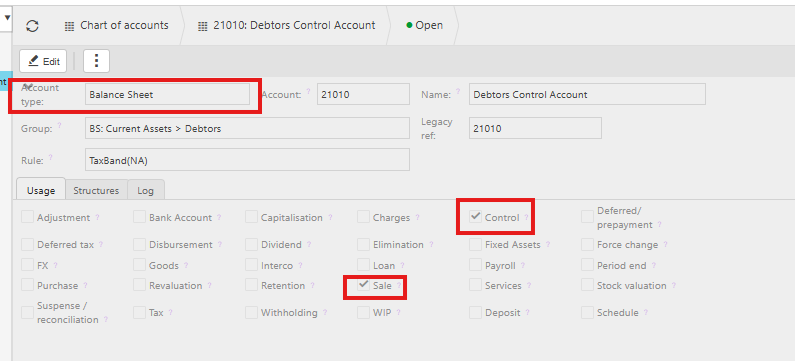
To set up a debtors control account as an account default in the General Ledger, select the following two usage tick boxes on the account:
- 'Control' — enables the account to function as a control account
- 'Sale' — assigns the account to the debtors (sales) ledger
Both tick boxes must be selected together. The 'Control' tick box alone is not sufficient — the 'Sale' tick box tells iplicit which ledger the control account serves.
This option is only available for accounts with an account type of Balance Sheet. No other usage tick boxes are required for the debtors control account to function as intended.
Why you should not change these tick boxes after setup
Once the account is saved as an account default with 'Control' and 'Sale' selected, do not untick either box. Removing either tick box after setup affects where documents appear on your ledger and control account reports.
If you need to change the debtors control account, contact iplicit support before making any adjustments.
Debtors control account settings
Control account settings
Control tick box
Account set up