

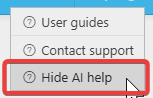
You cannot move the AI Button, but you can toggle the AI Help on or off. To do this, go to the top right‑hand corner of your screen and click the quest ion mark (?) icon. From there, you will see the option to Hide AI Help.
Please note: If you log out of iplicit or perform a reload, you will need to toggle the AI button off again if you do not wish it to appear in your current view
Customer search terms
Hide AI function
Hide AI Assistant
Remove AI help
_______________________________________________________________________________________